Setting Up Agent Sandboxes in Kubernetes
How I wired kubernetes-sigs/agent-sandbox into a LangGraph agent, dropped the broken official integration, and built a real trust boundary around shell execution
Allowing an autonomous AI agent to run arbitrary shell commands is terrifying. Allowing it inside your primary production Kubernetes cluster is even worse.
The official documentation directs developers toward langchain-kubernetes and kubernetes-sigs/agent-sandbox. When deployed to a live cluster, that path quickly hits broken SDK wrappers and missing runtime components.
Here is how we achieved local, self-hosted code execution in Kubernetes without exposing cloud credentials or paying for a third-party sandbox SaaS.
The Architecture and Trust Boundary
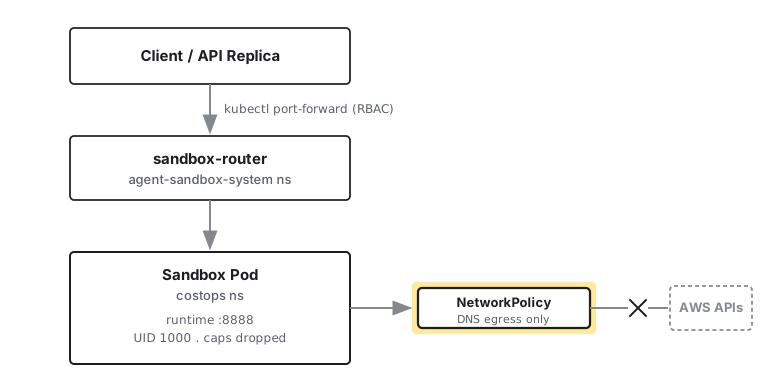
The primary chat agent has read-only AWS access via MCP tools. The sandbox environment must be structurally incapable of accessing those cloud credentials. Rather than relying on soft prompt instructions, isolation is enforced directly through Kubernetes primitives.
Why We Chose Native Kubernetes Sandboxes
We evaluated several execution environments before committing to an in-cluster solution:
| Solution | Verdict | Why It Was Ruled Out |
|---|---|---|
| AWS AgentCore | Rejected | Managed Bedrock dependency; not native to Kubernetes |
| E2B | Rejected | Requires bare metal or Firecracker; does not fit standard managed EKS or Minikube |
| Daytona | Rejected | BYOC model still relies on an external SaaS control plane |
| Modal / Runloop | Rejected | Adds external network hops and introduces vendor lock-in |
| k8s-agent-sandbox | Adopted | Native CRDs, fully self-hosted, integrates with standard Kubernetes NetworkPolicies |
The Implementation: Adapter and Lifecycle
deepagents defaults to StateBackend, an in-memory virtual filesystem that cannot execute bash commands or persist files across turns.
Because the langchain-kubernetes package had method and parameter mismatches with the real k8s-agent-sandbox SDK, we built a 120-line custom adapter directly against BaseSandbox.
class _AgentSandbox(BaseSandbox):
    def __init__(self, sandbox) -> None:
        self._sandbox = sandbox

    @property
    def id(self) -> str:
        return self._sandbox.claim_name  # Stable across warm-pool rebinds

    def execute(self, command: str, *, timeout: int | None = None) -> ExecuteResponse:
        result = self._sandbox.commands.run(command, timeout=timeout or 60)
        output = result.stdout
        if result.stderr:
            output = f"{output}\n{result.stderr}" if output else result.stderr
        return ExecuteResponse(output=output, exit_code=result.exit_code)

    def upload_files(self, files: list[tuple[str, bytes]]) -> list[FileUploadResponse]:
        responses = []
        for path, content in files:
            try:
                self._sandbox.files.write(path, content)
                responses.append(FileUploadResponse(path=path, error=None))
            except Exception as e:
                responses.append(FileUploadResponse(path=path, error=str(e)))
        return responses

    def download_files(self, paths: list[str]) -> list[FileDownloadResponse]:
        responses = []
        for path in paths:
            try:
                content = self._sandbox.files.read(path)
                responses.append(FileDownloadResponse(path=path, content=content, error=None))
            except Exception as e:
                responses.append(FileDownloadResponse(path=path, content=None, error=str(e)))
        return responses
To maintain persistent workspaces across conversation turns without locking memory to a single API replica, claim IDs are stored in Redis:
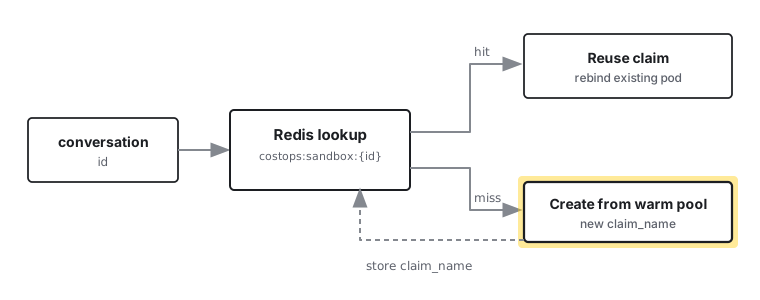
async def get_sandbox_backend(conversation_id: str) -> _AgentSandbox | None:
    if not settings.sandbox_enabled or not settings.sandbox_warmpool_name:
        return None

    namespace = settings.sandbox_namespace or "default"
    redis_key = f"costops:sandbox:{conversation_id}"
    existing_claim_name = await redis.get(redis_key)

    client = SandboxClient()
    try:
        sandbox = None
        if existing_claim_name:
            try:
                sandbox = await asyncio.to_thread(client.get_sandbox, existing_claim_name, namespace)
            except SandboxNotFoundError:
                pass
        if sandbox is None:
            sandbox = await asyncio.to_thread(
                client.create_sandbox,
                warmpool=settings.sandbox_warmpool_name,
                namespace=namespace,
                shutdown_after_seconds=settings.sandbox_idle_timeout_seconds,
            )
    except Exception:
        return None

    if sandbox.claim_name != existing_claim_name:
        await redis.set(redis_key, sandbox.claim_name)
    return _AgentSandbox(sandbox)
The Gotcha: The Cross-Namespace RBAC Trap
The most confusing failure during implementation was an RBAC error masked as a broken controller.
SandboxClient connects using connection_mode="tunnel", which shells out to a local kubectl port-forward command. That command must resolve and forward to the sandbox-router running in the agent-sandbox-system namespace, not just resources in your application namespace.
Your API ServiceAccount requires two separate RBAC bindings:
# 1. In your application namespace (manage sandbox lifecycle)
- apiGroups: ["agents.x-k8s.io"]
  resources: ["sandboxes"]
  verbs: ["get", "list", "watch", "create", "delete", "patch"]
- apiGroups: ["extensions.agents.x-k8s.io"]
  resources: ["sandboxclaims"]
  verbs: ["get", "list", "watch", "create", "delete", "patch"]
- apiGroups: ["extensions.agents.x-k8s.io"]
  resources: ["sandboxwarmpools"]
  verbs: ["get", "list", "watch"]
- apiGroups: [""]
  resources: ["pods", "pods/portforward"]
  verbs: ["get", "list", "watch"]
---
# 2. In agent-sandbox-system (allow port-forwarding to the router)
- apiGroups: [""]
  resources: ["services", "pods", "pods/portforward"]
  verbs: ["get", "list", "watch"]
Hardening and Safety Verification
Security relies on strict infrastructure policies:
- No IAM Role Binding: The
costops-sandboxServiceAccount carries no AWS IAM annotations ([eks.amazonaws.com/role-arn](https://eks.amazonaws.com/role-arn)) and mounts no cloud tokens. - DNS-Only Egress: Network policies deny all outbound internet and VPC traffic except UDP/TCP port 53 for internal cluster DNS.
- Pod Hardening: Containers run as UID 1000 with
allowPrivilegeEscalation: falseand all Linux capabilities dropped.
We verified the isolation directly inside a live sandbox pod:
kubectl -n costops exec -it <sandbox-pod> -- env | grep -i aws
kubectl -n costops exec -it <sandbox-pod> -- aws sts get-caller-identity
Both commands return empty results and connection timeouts.
Key Takeaways
- Treat every agent sandbox as an untrusted workload by dropping Linux capabilities and enforcing non-root execution.
- Do not rely on system prompts for security boundaries. Use Kubernetes NetworkPolicies and clean ServiceAccounts instead.
- Store conversation-to-claim mappings in shared storage like Redis rather than local process memory.
- Grant port-forward RBAC permissions in both the application namespace and the system routing namespace.
- Keep the runtime execution container separate from your main backend image to avoid credential leakage.
Building a secure code execution sandbox for AI agents does not require expensive managed platforms or complex bare-metal virtualization. By combining kubernetes-sigs/agent-sandbox with strict NetworkPolicies, dedicated ServiceAccounts, and a lightweight adapter, you get full control over your infrastructure, complete data privacy, and robust security guarantees right inside your existing cluster.